
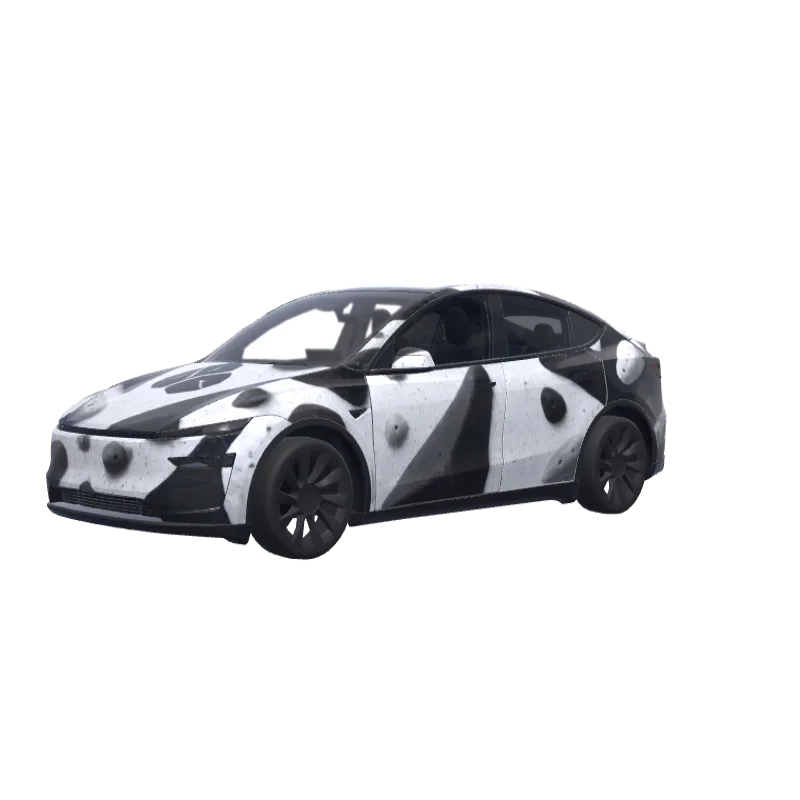
Bouldering Gym Problem
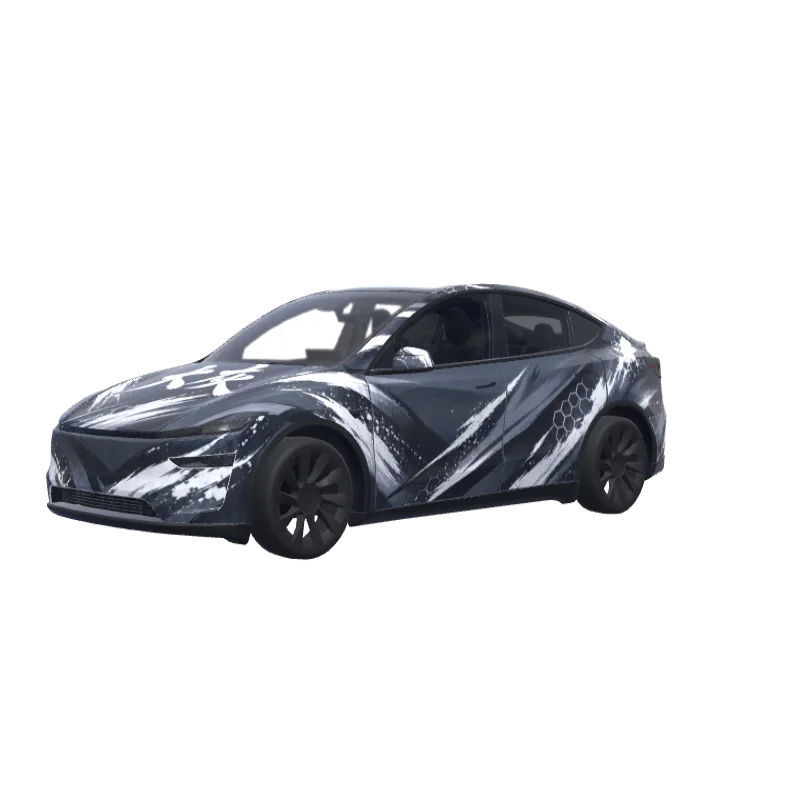
Bold black and white blocks for a bouldering gym fan, with the word "problem" above the rear plate.
Mason Wallace
00
Passar Model Y (2025+) Premium
Wrap-mallar skiljer sig mellan versioner. Kontrollera att den passar din bil innan du installerar den.
PNG · 1024 × 1024 · Gratis nedladdning · Ingen inloggning krävs
PromptVisa
On the attached reference, there are 2 elements, both referring to the bouldering gym I’m attending - at the top, there’s a “problem” word, which I’d like to include in this exact font on the rear of the car - not where the registration plate would land, but rather above it. Make it fit to the overall design of the app and lay among the boulder structures (that I’ll describe below in a minute). Right below the “problem” word on the reference, there’s a logotype of this bouldering wall. I want to use it in the design - preferably place it on middle of the hood. The overall design of the wrap has to be minimalistic, modern, only depicting structures that resemble bouldering holds (that I’ve mentioned before), apart of the two elements sourced from the reference image. Keep it black and white. Do not make the design overly complicated.
Fler Model Y (2025+) Premium-wrapdesigner
Alla Model Y (2025+) Premium-designer
Så installerar du i Tesla Paint Shop
Ladda ned wrap-PNG-filen.
Ladda ned Model Y (2025+) Premium-wrappen som PNG i 1024×1024 och högst 1 MB.
Ladda upp med Tesla-appen.
I Tesla App v4.59.0 eller senare, öppna Creations → Wrap → Upload och välj PNG-filen.
Använd den i Paint Shop.
Öppna Toybox → Paint Shop → Wraps, välj wrappen och förhandsgranska den på bilens 3D-modell.
Vanliga frågor
Bouldering Gym Problem är en gratis wrap för Tesla Model Y (2025+) Premium. Den laddas ned som en PNG på 1024×1024 i det format Tesla Paint Shop kräver, redo att installeras med Tesla-appen eller ett USB-minne – utan konto.
Är denna Model Y (2025+) Premium-wrap gratis?
Ja. Denna Model Y (2025+) Premium-wrap kan laddas ned gratis som PNG, utan konto eller betalning.
Vilket filformat och vilken storlek används?
Den laddas ned som PNG i 1024×1024 och högst 1 MB. Tesla accepterar PNG från 512×512 till 1024×1024 pixlar, och mallstorleken rekommenderas.
Hur installerar jag wrappen på min Model Y (2025+) Premium?
Ladda ned PNG-filen och använd Tesla App v4.59.0 eller senare under Creations → Wrap → Upload. Som USB-alternativ lägger du den i mappen ”Wraps” i roten och öppnar Toybox → Paint Shop → Wraps.
Kan jag anpassa designen före användning?
Ja. Öppna Bouldering Gym Problem i den kostnadsfria wrapredigeraren för att ändra färger, lägga till text eller bilder och exportera din egen PNG.