
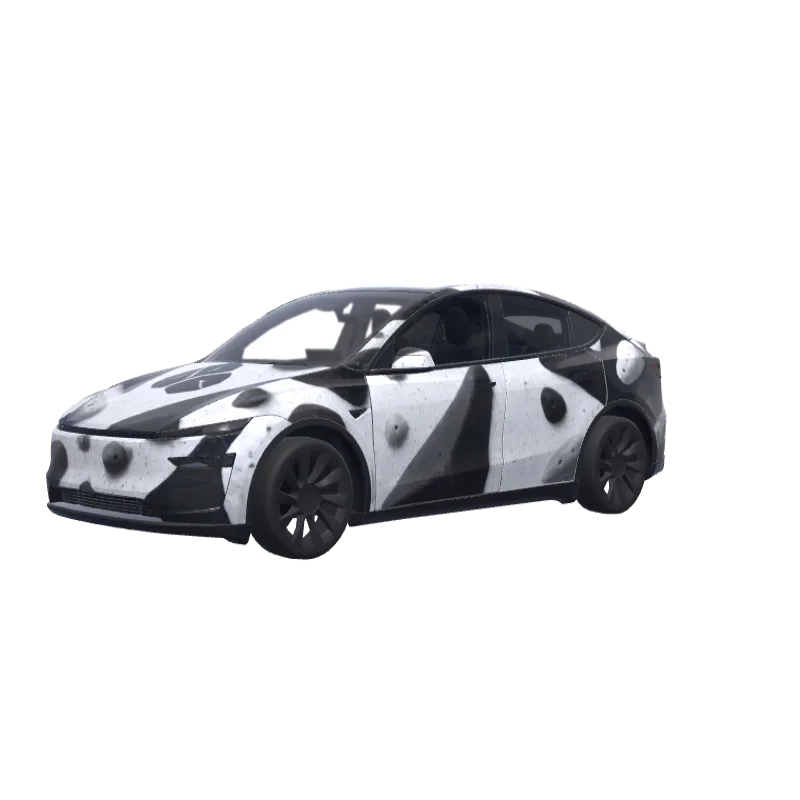
Bouldering Gym Problem
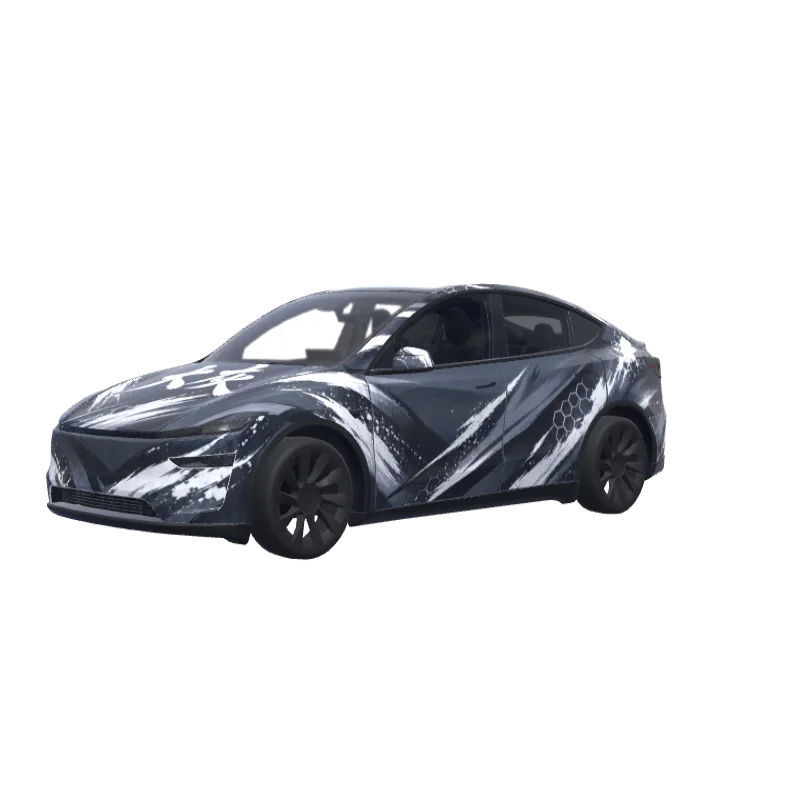
Bold black and white blocks for a bouldering gym fan, with the word "problem" above the rear plate.
Mason Wallace
00
Fits Model Y (2025+) Premium
Wrap templates differ between versions. Check that this matches your car before you install it.
PNG · 1024 × 1024 · Free download · No sign-in needed
PromptShow
On the attached reference, there are 2 elements, both referring to the bouldering gym I’m attending - at the top, there’s a “problem” word, which I’d like to include in this exact font on the rear of the car - not where the registration plate would land, but rather above it. Make it fit to the overall design of the app and lay among the boulder structures (that I’ll describe below in a minute). Right below the “problem” word on the reference, there’s a logotype of this bouldering wall. I want to use it in the design - preferably place it on middle of the hood. The overall design of the wrap has to be minimalistic, modern, only depicting structures that resemble bouldering holds (that I’ve mentioned before), apart of the two elements sourced from the reference image. Keep it black and white. Do not make the design overly complicated.
More Model Y (2025+) Premium wrap designs
All Model Y (2025+) Premium designs
How to install on Tesla Paint Shop
Download the wrap PNG.
Download this Model Y (2025+) Premium wrap as a 1024×1024 PNG file no larger than 1 MB.
Upload with the Tesla App.
In Tesla App v4.59.0 or later, open Creations → Wrap → Upload and select the PNG.
Apply it in Paint Shop.
Open Toybox → Paint Shop → Wraps, select the custom wrap and preview it on your car’s 3D model.
Frequently asked questions
Bouldering Gym Problem is a free wrap for the Tesla Model Y (2025+) Premium. It downloads as a 1024×1024 PNG in the format Tesla Paint Shop expects, ready to install with the Tesla App or a USB drive — no account needed.
Is this Model Y (2025+) Premium wrap free to download?
Yes. This Model Y (2025+) Premium wrap is completely free to download as a PNG, with no account or payment required.
What file format and size does it use?
It downloads as a 1024×1024 pixel PNG no larger than 1 MB. Tesla accepts PNGs from 512×512 through 1024×1024 pixels, with the template size recommended.
How do I install this wrap on my Model Y (2025+) Premium?
Download the PNG, then use Tesla App v4.59.0 or later at Creations → Wrap → Upload. As a USB fallback, put it in a root-level “Wraps” folder and open Toybox → Paint Shop → Wraps.
Can I customize this design before using it?
Yes. Open Bouldering Gym Problem in the free wrap editor to change colors, add text or images and export your own PNG.