
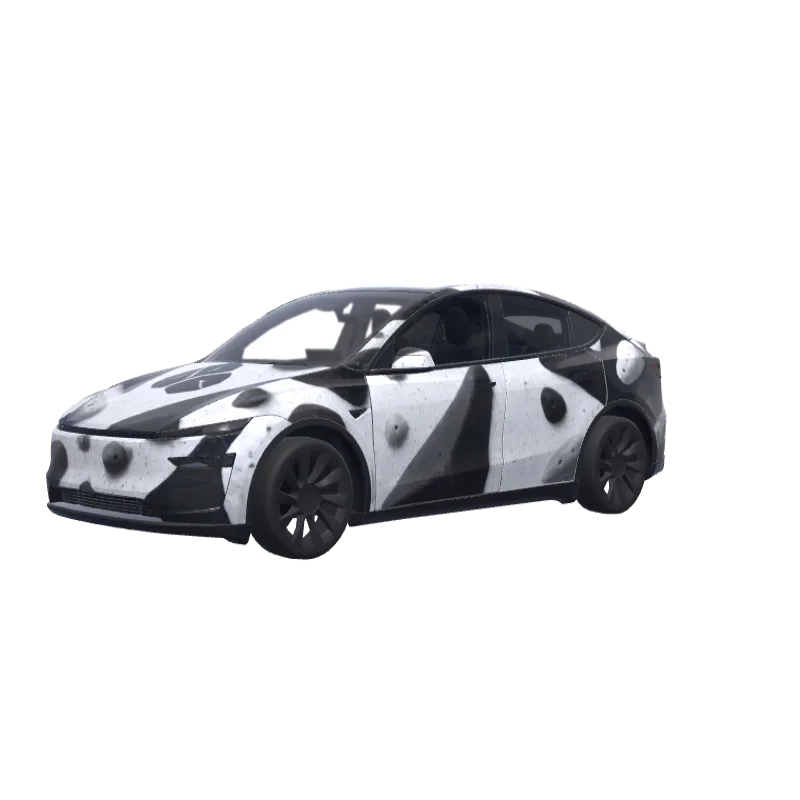
Bouldering Gym Problem
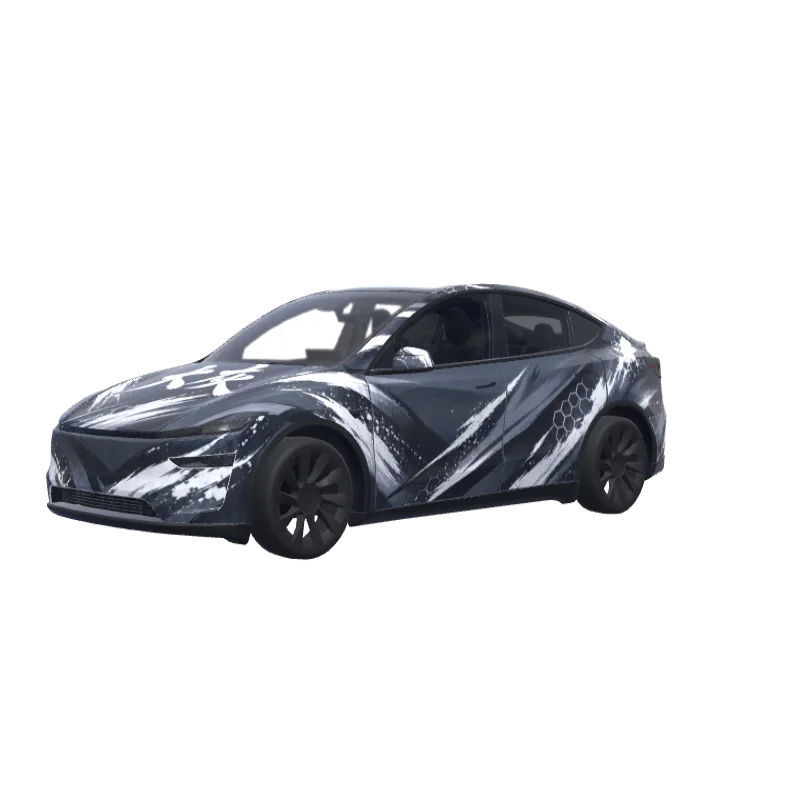
Bold black and white blocks for a bouldering gym fan, with the word "problem" above the rear plate.
Mason Wallace
00
Passer til Model Y (2025+) Premium
Wrap-skabeloner er forskellige fra version til version. Tjek, at den passer til din bil, før du installerer den.
PNG · 1024 × 1024 · Gratis download · Intet login nødvendigt
PromptVis
On the attached reference, there are 2 elements, both referring to the bouldering gym I’m attending - at the top, there’s a “problem” word, which I’d like to include in this exact font on the rear of the car - not where the registration plate would land, but rather above it. Make it fit to the overall design of the app and lay among the boulder structures (that I’ll describe below in a minute). Right below the “problem” word on the reference, there’s a logotype of this bouldering wall. I want to use it in the design - preferably place it on middle of the hood. The overall design of the wrap has to be minimalistic, modern, only depicting structures that resemble bouldering holds (that I’ve mentioned before), apart of the two elements sourced from the reference image. Keep it black and white. Do not make the design overly complicated.
Flere Model Y (2025+) Premium-wrapdesigns
Alle Model Y (2025+) Premium-designs
Sådan installerer du i Tesla Paint Shop
Download wrap-PNG-filen.
Download denne Model Y (2025+) Premium-wrap som PNG i 1024×1024 og højst 1 MB.
Upload med Tesla-appen.
I Tesla App v4.59.0 eller nyere skal du åbne Creations → Wrap → Upload og vælge PNG-filen.
Anvend den i Paint Shop.
Åbn Toybox → Paint Shop → Wraps, vælg wrappen, og se den på bilens 3D-model.
Ofte stillede spørgsmål
Bouldering Gym Problem er en gratis wrap til Tesla Model Y (2025+) Premium. Den downloades som en PNG på 1024×1024 i det format, Tesla Paint Shop forventer, klar til at blive installeret med Tesla-appen eller et USB-stik – uden konto.
Er denne Model Y (2025+) Premium-wrap gratis?
Ja. Denne Model Y (2025+) Premium-wrap kan downloades gratis som PNG uden konto eller betaling.
Hvilket filformat og hvilken størrelse bruger den?
Den downloads som PNG i 1024×1024 og højst 1 MB. Tesla accepterer PNG fra 512×512 til 1024×1024 pixels, og skabelonstørrelsen anbefales.
Hvordan installerer jeg denne wrap på min Model Y (2025+) Premium?
Download PNG-filen, og brug Tesla App v4.59.0 eller nyere under Creations → Wrap → Upload. Som USB-alternativ kan du lægge den i mappen “Wraps” i roden og åbne Toybox → Paint Shop → Wraps.
Kan jeg tilpasse designet før brug?
Ja. Åbn Bouldering Gym Problem i den gratis wrapeditor for at ændre farver, tilføje tekst eller billeder og eksportere din egen PNG.